Create Your Own Agent
Build a completely custom AI agent with your own system prompt, personality, and expertise — then email it like any other agent.
Create Your Own Agent
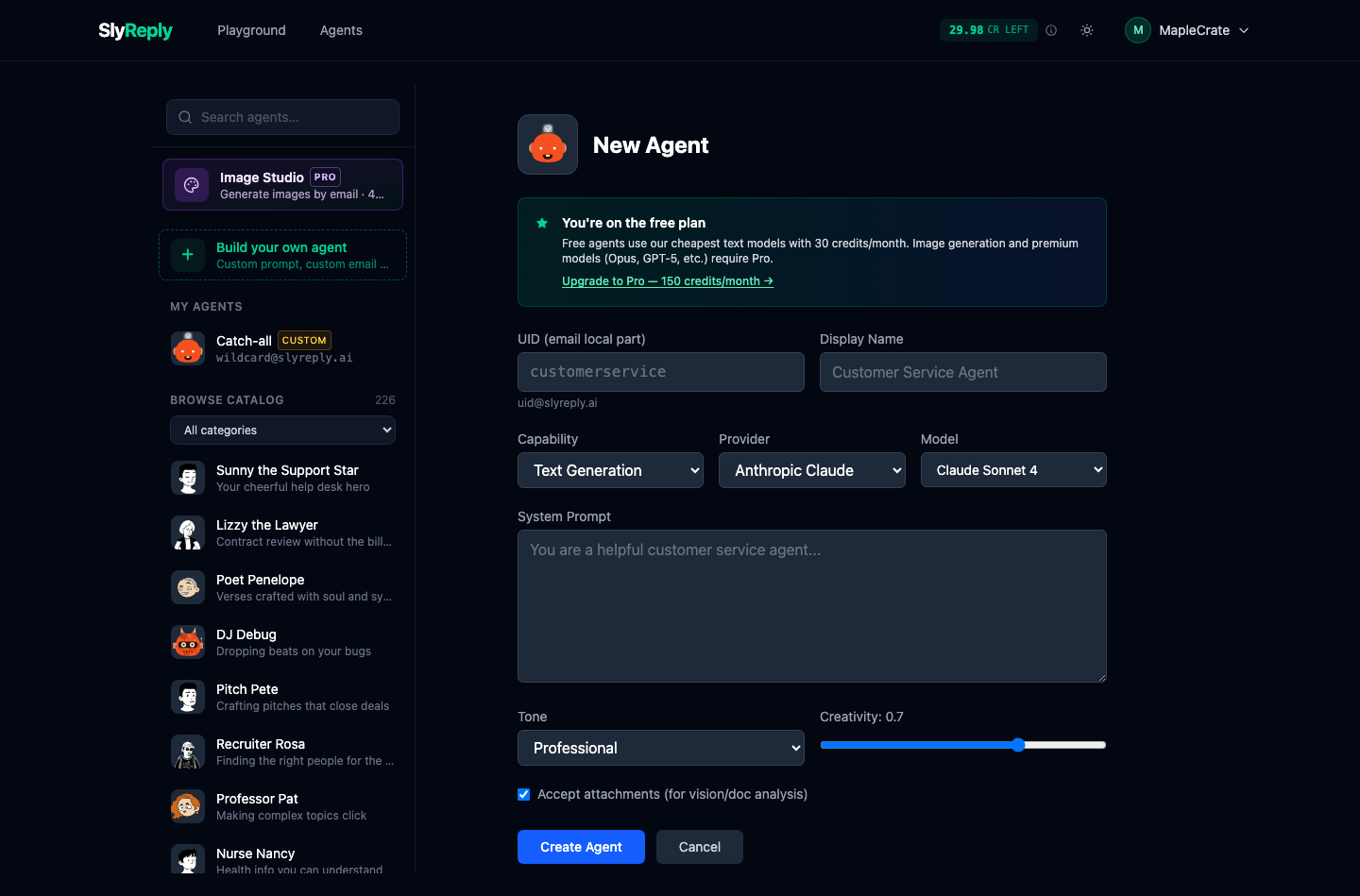
You are not limited to the 220+ pre-built agents in the catalog. You can create a completely custom agent tailored to your exact needs — your own AI expert, available via email.
Why create a custom agent?
- Company-specific knowledge — an agent that knows your products, pricing, policies, and tone of voice
- Niche expertise — a specialist that no pre-built agent covers (e.g., "Review my Shopify store listings" or "Critique my architecture diagrams")
- Personal workflows — a daily standup summariser, a meeting notes formatter, a journal prompt generator
- Team tools — shared agents anyone on your team can email
How to create an agent
- Open the Playground (or click "Build your own agent" in the agent picker rail).
- The middle pane swaps to a New Agent form alongside the agent picker on the left — you can bail out to an existing agent any time without losing your place.
- Fill in the details:
| Field | What it does |
|---|---|
| Email address | The part before @ (e.g., my-agent becomes my-agent@slyreply.ai). Lower-case letters, numbers, dots, dashes. |
| Display Name | A friendly name for the agent — shown to you, never emailed out |
| Avatar | The agent's picture. Pick an art style, then use Shuffle look for a different one in that style. Catalog agents each have a distinct look; custom agents can too. |
| What it does | Text Generation for prose / code / analysis / replies; Image Generation for images-out (Pro feature) |
| AI service (Provider) | Anthropic (Claude), OpenAI (GPT), or Stability AI (image gen) |
| Model | Specific model under the chosen AI service. Cheapest at the top; premium models marked (Pro) for free users |
| Agent Instructions (system prompt) | The instructions that define your agent's behaviour |
| Tone / Style | Optional style modifiers — Professional / Casual / Formal / Friendly, plus language, length, format and reading level |
| Creativity | How varied vs. consistent the replies are. 0.7 works for most business email. |
| Accept attachments | Toggle for whether this agent reads email attachments (Pro+ feature regardless) |
After Create Agent you'll land in chat-with-it mode, ready to test before sending real emails.
Email addresses are unique within your account
An agent's email address is unique within your own account, not across the whole of SlyReply. Two different SlyReply accounts can both have an agent called helpdesk@slyreply.ai — and that's fine, because your from address is the routing key. When you email helpdesk@slyreply.ai from one of your registered email addresses, SlyReply looks up YOUR helpdesk agent. When a different account's user emails the same address from THEIR registered email, the system routes to THEIR helpdesk agent. The two never see each other's messages.
If you try to claim a name you already use, the form returns a "name already taken" error and you pick a different one — but the conflict is with your own previous choice, not someone else's account. Pick whatever's clear to you.
If you delete an agent, the address is released straight away from your account; you can re-create it later as a brand-new agent (not the old one restored).
Reserved names
A small set of addresses is never available to anyone, regardless of account — they're reserved for SlyReply system mail and to prevent agents from impersonating platform infrastructure:
postmaster, hostmaster, webmaster, abuse, security, verify, noreply, no-reply, bounce, mailer-daemon, support, admin, root
These are the RFC 2142 system addresses plus a handful that look enough like SlyReply's own transactional mail (verify@, noreply@, support@) to mislead a recipient. Picking one of these returns a "reserved for system use" error with a few alternative suggestions.
Beyond the reserved list, there's nothing to squat: each account has its own slug namespace, so claiming a common name in your account doesn't affect anyone else.
The text-vs-image choice is permanent
What it does — Text Generation versus Image Generation — is locked once the agent is created. The model and generation settings depend on it, so it can't be switched afterwards. If you need the other capability, create a second agent. The create form warns you about this before you save.
Your system prompt is private
The system prompt is stored securely on SlyReply's servers. It is never shown to the people who email your agent — they only ever see the agent's replies. Treat it as your agent's private playbook.
A note on free vs Pro models
Free accounts can only pick from the cheapest models in each provider's lineup. Premium models (Opus, GPT-5, Stability Ultra, etc.) are marked (Pro) in the dropdown and disabled until you upgrade. The form shows an inline note when you select a premium model so you know which plan it needs.
See Plans & Pricing for which models each plan includes.
Writing a good system prompt
The system prompt is the most important part. Example for a custom support agent:
You are the support assistant for Acme Software.

Product details:
- Acme Pro: $29/month or $290/year
- Free trial: 14 days, no credit card required
- Refund policy: full refund within 30 days

Rules:
- Always be polite and professional
- If you don't know the answer, say so and suggest contacting support@acme.com
- Include links to docs.acme.com where relevant
- Sign off with "— The Acme Support Team"
Tips
- Be specific — "You are a Python code reviewer who focuses on security vulnerabilities" works better than "You review code"
- Include examples — show the agent what good output looks like
- Set boundaries — tell the agent what it should NOT do ("Never provide medical diagnoses")
- Iterate — test with a few emails in the Playground, tweak the prompt, repeat
Alternative: customize an existing agent
If a pre-built agent is close to what you need, Customize it instead of starting from scratch. Click any agent in the picker rail, then click Customize — adjust prompt, model, temperature, tone, and save. You get a personal copy that you can always reset to the original from the My Agents page.
The catch-all (wildcard) agent
Every account ships with one Catch-all agent at anything@slyreply.ai. If you email any prefix that doesn't match a named agent (typo, on-the-spot guess, anything), it routes here automatically. Edit it from the Agents page like any other agent — you can change the prompt, swap the model, or disable it entirely. RFC 2142 system addresses (postmaster, abuse, etc.) never route to the catch-all even when it's enabled.